Tutorial — a trading floor with brote
Build a live OCaml trading floor step by step, from its matching engine and event log to a brote client and cluster.
What we'll build
The trading floor is the most complete brote application: a real price-time matching engine streaming to many browsers at once. This tutorial takes it apart layer by layer — the pure domain, the shared wire protocol, the application service, the one live socket, and the brote client — so that by the end you can read every file and know why it is shaped the way it is.
What the screen shows: a live quotes table, a sector heatmap with top movers, an order ticket, your private portfolio with mark-to-market P/L, a trades tape, a leaderboard, and a chat panel.
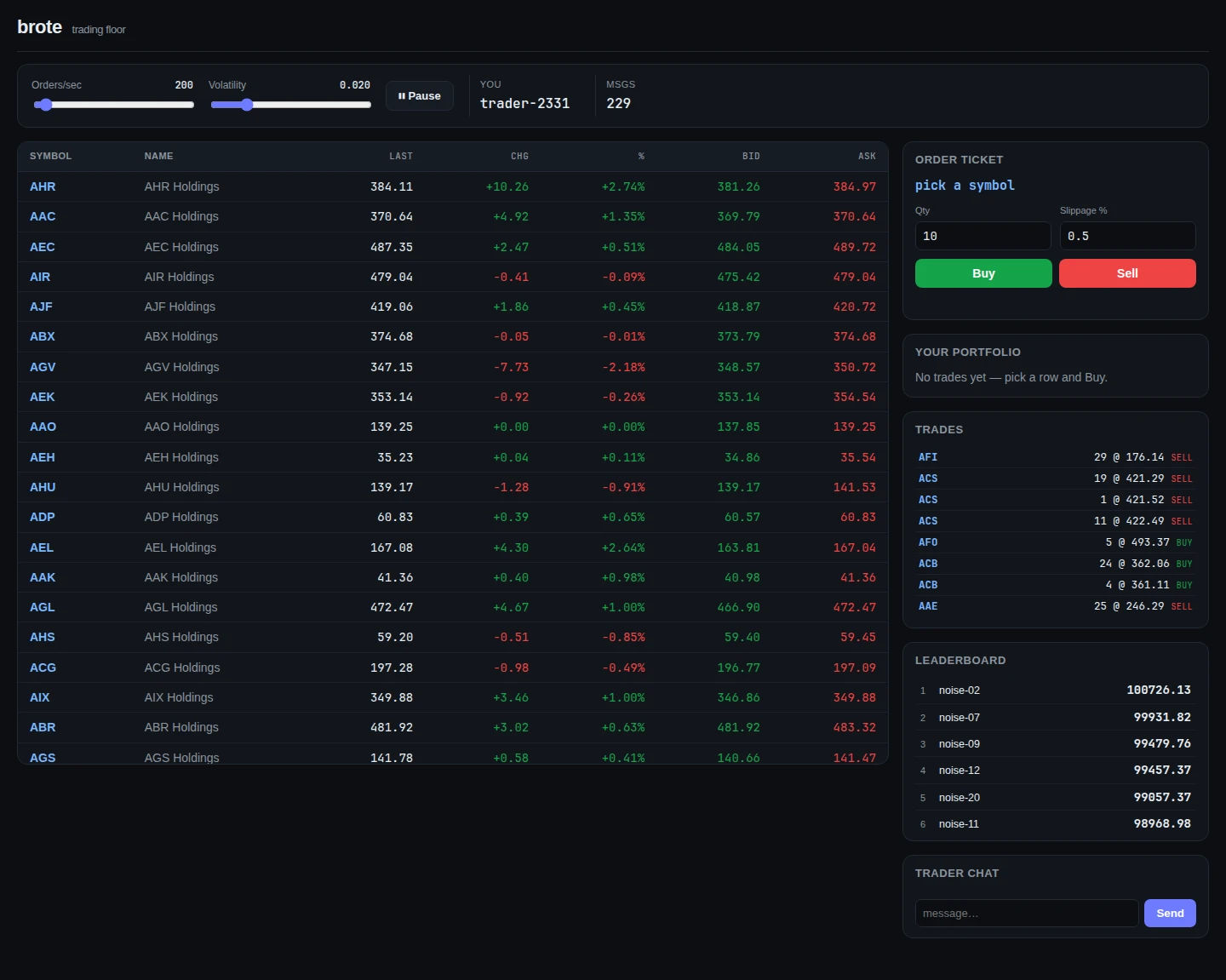
Follow along. The example lives in the brote repository under
examples/trading-floor. Build once and run it:$ dune build$ dune exec examples/trading-floor/bin/main.exeThen open
http://localhost:8080. Thedune buildalso compiles the browser client to JavaScript and promotes it next to the stylesheet, so there is no separate bundler step.
The shape of the application
Before the code, the layering. The arrows are ordinary function calls and one socket — nothing is hidden between them.
browser ── POST /api/orders ──▶ floor_web ──▶ Floor.Exchange.place
                                                  │
                                                  ▼
                                        Order.Book.execute   (pure: match → events)
                                                  │  events
                                                  ▼
                                     project → Portfolio + Market + tape
                                                  │
                                                  ▼
                                        Brote.Sync.Server  (read models)
                                                  │  one multiplexed WebSocket
                                                  ▼
browser ◀──────────── brote_web client (per-key signals patch the DOM)
The domain (order, portfolio, market, chat) is pure and compiles to native and JavaScript. The wire protocol (floor_wire) is shared by both ends. The application service (floor) wires the pure core to the outside world. floor_web is the hcs server. client/ is the brote browser app. We'll take them in that order.
Step 1 — the domain: an event-sourced order book
The heart of the system is one pure function. The Order context speaks a small language of commands and events, written as types:
type command =
  | Place of {
      id : Ids.Order_id.t;
      trader : Trader_id.t;
      side : side;
      limit : Price.t;  (* buy: max price to pay; sell: min price to accept *)
      qty : Qty.t;
    }
  | Cancel of { id : Ids.Order_id.t; trader : Trader_id.t }

type event =
  | Order_accepted of { id; trader; side; limit; qty; seq }
  | Trade_executed of trade   (* names both parties, price and qty *)
  | Order_resting of { id; trader; side; limit; remaining; seq }
  | Order_filled of { id }
  | Order_cancelled of { id; trader }
The book is the aggregate — one per symbol, the consistency boundary — and its whole API is one execute that decides and returns events without mutating the world:
val execute : t -> Events.command -> (t * Events.event list, Events.reject) result
(** For a [Place]: [Order_accepted], a [Trade_executed] (and [Order_filled]) per
    fill in strict price-time priority, then [Order_resting] for any
    non-marketable remainder. Each fill is at the maker's resting price. *)
Because execute is pure — no I/O, no clock, no randomness — the matching laws are property-tested, and the identical engine runs on the server (and could run in the browser). Money is integer cents throughout; a price is never a float. Events are the only contract the rest of the system consumes: Portfolio and Market project from Trade_executed and never reach back into the book.
Step 2 — the wire protocol, shared by both ends
floor_wire is compiled to native and JavaScript, so the server and the browser literally share one definition of every message. The read-model DTOs are records with [@@deriving brote_json], and the design splits a quote by how often each part changes — static listing data sent once, dynamic tick data on the hot path:
type listing = { ticker : string; name : string; sector : string; prev_close : int }
[@@deriving brote_json]

type tick = {
  last : int;  (* last trade price, cents *)
  bid : int;  (* best bid in cents, 0 when empty *)
  ask : int;  (* best ask in cents, 0 when empty *)
}
[@@deriving brote_json]
Each live feed is an App descriptor — a typed handle that pairs a name with its key and value codecs. Both ends refer to the same descriptor, so a stream can never be wired up with mismatched types:
let value to_json of_json = App.Value.make ~to_json ~of_json

let listings = App.stream ~name:"floor.listings" ~key:App.Key.string ~value:(value listing_to_json listing_of_json) ()
let quotes   = App.stream ~name:"floor.quotes" ~key:App.Key.string ~value:(value tick_to_json tick_of_json) ()
let chat     = App.collection ~name:"floor.chat" ~key:App.Key.string ~value:(value chat_msg_to_json chat_msg_of_json) ()
let control  = App.command ~name:"floor.control" ~value:(value control_to_json control_of_json) ()
Finally the boundary parser — parse, don't validate: turn raw input into a trusted typed value at the boundary, so nothing past it has to re-check. An order arrives as untrusted JSON; this turns it into a trusted domain command (or a typed error), so nothing downstream ever sees an unvalidated string:
let parse_order json =
  let ( let* ) = Result.bind in
  let req name = function Some x -> Ok x | None -> Error ("bad " ^ name) in
  let* r = order_request_of_json json in
  let* trader = req "trader" (Trader_id.of_string r.trader) in
  let* symbol = req "symbol" (Symbol.of_string r.symbol) in
  let* side = req "side" (Events.side_of_string r.side) in
  let* qty = req "qty" (Qty.of_int r.qty) in
  let* limit = req "limit" (Price.of_cents r.limit) in
  Ok { trader; symbol; side; limit; qty }
Step 3 — the application service
Floor.Exchange is the edge that wires the pure domain to the world. It owns the canonical state — a book per symbol, a portfolio per trader — and the Brote.Sync.Server read models that stream to browsers. It has two entry points. The ungated submit is the core — run a command and project the events it returns:
let submit t ~symbol cmd =
  match Book.execute (get_book t symbol) cmd with
  | Error _ -> []
  | Ok (book', evs) ->
      Hashtbl.replace t.books (Symbol.to_string symbol) book';
      project t symbol book' evs;
      evs
The gated place is the human/API path: it checks spot solvency first — a data-dependent invariant that belongs at the edge, not in the pure book — then calls submit and summarizes the fill:
let place t ~(parsed : Wire.parsed) : Wire.order_response =
  let pf = get_portfolio t parsed.Wire.trader in
  let affordable =
    match parsed.Wire.side with
    | Events.Buy -> Money.compare pf.Portfolio.cash (Money.cost parsed.Wire.limit parsed.Wire.qty) >= 0
    | Events.Sell -> Portfolio.position_qty pf parsed.Wire.symbol >= Qty.to_int parsed.Wire.qty
  in
  if not affordable then Wire.Rejected_response { reason = "insufficient funds" }
  else begin
    (* … run submit, total the fills, answer Accepted_response … *)
  end
The simulator is what makes the market feel alive. It is a liquidity model, not a price oracle: each tick it submits a burst of random valid limit orders through the very same submit workflow a human order takes. So the price emerges from real matching — we never fake a number.
let step t =
  if Atomic.get t.running then begin
    let r = Atomic.get t.rate and vol = Atomic.get t.volatility in
    let per_tick = max 1 (r / tick_hz) in
    (* … pick a random symbol, jitter the last price by volatility, … *)
    (*     build a valid Place from smart constructors, and submit it … *)
  end

let run_worker t ~clock =
  Exchange.seed t.exchange;             (* opening liquidity *)
  let dt = 1. /. float_of_int tick_hz in
  let rec loop () = Eio.Time.sleep clock dt; step t; loop () in
  loop ()
The two sliders at the top of the screen — orders per second and volatility — drive exactly these two atomics, live:
Step 4 — one socket, many streams
All the live data travels over a single WebSocket, multiplexed by Brote.Net.Mux into named channels. The server attaches each Sync.Server to a channel and routes inbound control commands and chat back through the same connection:
let handler ~exchange ~sim ~room ~router ws =
  Brote_hcs.serve ws ~setup:(fun transport ->
      let mux = Mux.create transport in
      let q = Mux.channel mux "q" in
      let detach_q = Sync.Server.attach (Exchange.quotes_server exchange) ~send:q.T.send () in
      q.T.on_message (fun raw ->
          match App.decode_command Wire.control raw with Some c -> Sim.apply_control sim c | None -> ());
      let me = Mux.channel mux "me" in
      me.T.on_message (fun trader -> Portfolio_router.subscribe router ~trader ~send:me.T.send |> ignore);
      let c = Mux.channel mux "c" in
      let client = Collab.Server.attach (Chatroom.room room) ~send:c.T.send in
      c.T.on_message (Collab.Server.receive (Chatroom.room room) client);
      fun () -> detach_q (); Collab.Server.detach (Chatroom.room room) client)
Six channels share one socket: q quotes, p leaderboard, t trades, l listings, me the trader's own portfolio (delivered privately), and c chat. The endpoint itself is four lines — the static plug for the bundle and CSS, the router for the page and order API, and this WebSocket handler:
let build ~clock ~place_order ~exchange ~sim ~room ~static_dir =
  let router = Portfolio_router.create ~exchange in
  Hcs.Endpoint.create Hcs.Endpoint.default_config
  |> Hcs.Endpoint.with_plug (Hcs.Plug.Static.create static_dir)
  |> Fun.flip Hcs.Endpoint.router (Router.routes ~clock ~place_order)
  |> Fun.flip Hcs.Endpoint.websocket (Socket.handler ~exchange ~sim ~room ~router)
Security caveat (demo). The trader identity on the
mechannel — like thetraderfield onPOST /api/orders— is client-asserted and unauthenticated. "Private" here means bandwidth-private, not access-controlled. A real app authenticates the connection and derives the trader id from the session in a pipeline plug, never from the payload.
Step 5 — the browser client
The client is layered: a pure view library (formatting and aggregates, unit-tested off-browser), a data layer that owns the socket, and presentational panels. main.ml is just identity and layout:
let () =
  Random.self_init ();
  let me = Printf.sprintf "trader-%04d" (Random.int 10000) in
  run @@ fun () ->
  let feeds = Feeds.connect ~me in
  let selected = S.source "" in
  main [ class_ "app floor" ]
    [
      Panels.controls feeds;
      div [ class_ "grid" ]
        [
          section [ class_ "maincol" ] [ Panels.dashboard feeds ~selected; Panels.stripe feeds ];
          aside [ class_ "side" ]
            [ Panels.ticket feeds ~selected; Panels.portfolio feeds; Panels.tape feeds; Panels.leaderboard feeds; Panels.chat feeds ];
        ];
    ]
The data layer
Feeds.connect opens one WebSocket, multiplexes it, and connects each channel to a typed stream or collection. The private portfolio is delivered after the client announces its trader id on Open:
let connect ~me =
  let base = Ws.transport (Ws.same_origin ()) in
  let mux = Mux.create base in
  let listings = connect_stream ~transport:(Mux.channel mux "l") Wire.listings in
  let quotes = connect_stream ~transport:(Mux.channel mux "q") Wire.quotes in
  let board = connect_stream ~transport:(Mux.channel mux "p") Wire.leaderboard in
  let tape = connect_stream ~transport:(Mux.channel mux "t") Wire.trades in
  let chat = connect_collection ~transport:(Mux.channel mux "c") Wire.chat in
  let me_tr = Mux.channel mux "me" in
  let portfolio = S.source None in
  me_tr.T.on_message (fun raw ->
      match Result.bind (Json.decode_string raw) Wire.portfolio_of_json with
      | Ok pf -> S.set portfolio (Some pf) | Error _ -> ());
  base.T.on_status (fun st -> if st = T.Open then me_tr.T.send me);
  { me; quotes; listings; board; tape; chat; my_portfolio = S.get portfolio }
Ws.transport reconnects on its own, and because a reconnect is a fresh connection the server re-ships its snapshot — so the client resyncs with no extra code.
The live quotes table
The dashboard is a keyed table: one row per ticker, each row bound to its own per-key signal. When a tick changes, only that row's cells patch — the other 239 rows, and any selection or focus, are untouched.
let dashboard (feeds : Feeds.t) ~selected =
  table [ class_ "stocks" ]
    [
      thead [] [ tr [] [ th [] [ txt' "Symbol" ]; (* … *) ] ];
      el_dyn "tbody" []
        (keyed (Sync.Client.entries feeds.quotes) ~key:Fun.id ~render:(fun ticker tk_sig ->
             Components.quote_row ~on_select:(S.set selected) ticker (let+ tk = tk_sig in Quotes.join feeds ticker tk)));
    ]
This is the rule from the brote reference in action: structure is static (the table is built once), values are dynamic (keyed varies the rows). The sector stripe derives entirely from the same joined quotes:
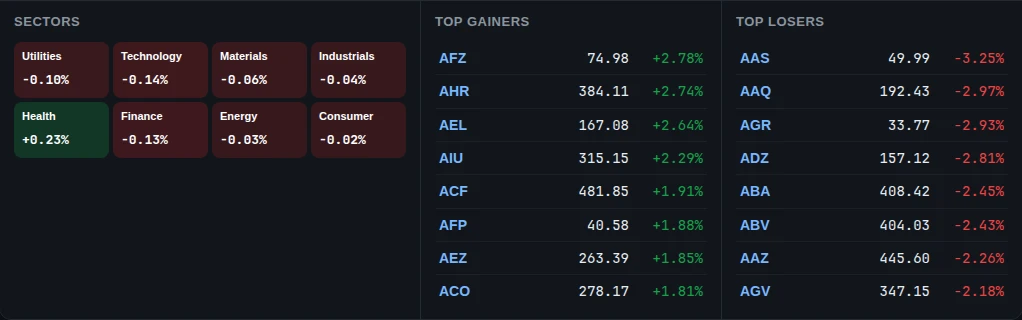
View.sector_summary and View.top_movers — recomputed incrementally as ticks arrive.The order ticket and your portfolio
Clicking a row sets the shared selected signal; the ticket derives its limit from the live last price plus a slippage percentage, then POSTs to /api/orders. The fill arrives reactively over the portfolio and trades streams — the HTTP response is only the synchronous acknowledgement.
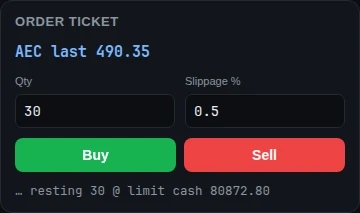
Placing an order and watching it land in the portfolio and the trades tape:
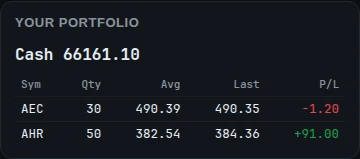
me channel. P/L is marked to the live last price — a derivation of your positions joined with the quotes feed.The portfolio view joins your positions against the live quotes to compute P/L per row:
let portfolio (feeds : Feeds.t) =
  section [ class_ "panel" ]
    [
      h3 [] [ txt' "Your portfolio" ];
      el_dyn "div" [ class_ "pf" ]
        (let+ pf_opt = feeds.my_portfolio and+ _ = Quotes.all feeds in
         match pf_opt with
         | None -> [ p [ class_ "muted" ] [ txt' "No trades yet — pick a row and Buy." ] ]
         | Some pf -> (* cash + a row per position, P/L marked to the last price *) [ … ]);
    ]
The trades tape and leaderboard
Both are plain derivations of a synced collection: take the values, sort, truncate, render. The tape is newest-first; the leaderboard is by net worth, with your own row highlighted.
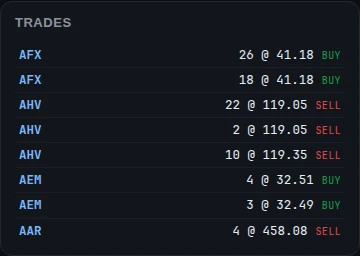
let tape (feeds : Feeds.t) =
  section [ class_ "panel" ]
    [ h3 [] [ txt' "Trades" ];
      el_dyn "ul" [ class_ "tape" ]
        (let+ rows = Sync.Client.values_signal feeds.tape in
         rows |> List.map snd
         |> List.sort (fun (a : Wire.trade_row) b -> compare b.seq a.seq)
         |> View.take 14
         |> List.map (fun r -> (* one <li> per trade *) …)) ]
CRDT chat
Chat is the one multi-writer collection: a Brote.Collab client. Every browser can set a message, and the replicas converge — last-writer-wins, and across cluster nodes too. Posting goes through the chat domain's smart constructor, so the rules for a valid message live in one place.
let post_chat t ~text =
  match Chat.Message.create ~author:t.me ~text ~ts:(now_ms () /. 1000.) with
  | None -> false
  | Some m ->
      let id = Printf.sprintf "%013.0f-%04d" (now_ms ()) (Random.int 10000) in
      Collab.Client.set t.chat id { Wire.author = m.author; text = m.text; ts = m.ts };
      true
Step 6 — run it and poke the API
With the app running on http://localhost:8080, the order API is a plain JSON endpoint — you can drive it without the browser:
$ curl -s localhost:8080/api/orders -H 'content-type: application/json' -d '{"trader":"curl-bot","symbol":"AAA","side":"buy","qty":10,"limit":40000}'The handler is transport-only — it reads the body and hands it to the injected place_order, which the composition root supplies:
let place ~place_order req =
  let reject reason = Brote_hcs.Json.respond (Wire.order_response_to_json (Wire.Rejected_response { reason })) in
  match Brote_hcs.Json.read req with
  | Error _ -> reject "malformed json"
  | Ok json -> Brote_hcs.Json.respond (Wire.order_response_to_json (place_order json))
Step 7 — going multi-node
The single-node app becomes a cluster by adding brote_hive replication in the composition root — the domain, the wire and the client do not change at all. Joining a hive.cluster.swim node and replicating the collections is a handful of lines:
ignore (Brote_hive.replicate_collection Wire.chat ~server:(Floor.Chatroom.room room) ~node ~name:"floor-chat");
ignore (Brote_hive.replicate_stream Wire.quotes ~server:(Floor.Exchange.quotes_server exchange) ~node ~name:"floor-quotes");
ignore (Brote_hive.replicate_stream Wire.trades ~server:(Floor.Exchange.trades_server exchange) ~node ~name:"floor-trades");
Chat is a CRDT, so it converges on every node; the market streams replicate from a single owner (a Placement singleton runs the simulator and authoritative book on exactly one node), and a non-owner routes each order to the owner and lets the fill return on the replicated streams. Start two nodes to see it:
$ # node 1 (seed / owner)$ MARKET_CLUSTER_ADDR=127.0.0.1 MARKET_CLUSTER_PORT=5000 PORT=8080 dune exec examples/trading-floor/bin/main.exe$ # node 2$ MARKET_CLUSTER_ADDR=127.0.0.1 MARKET_CLUSTER_PORT=5001 MARKET_CLUSTER_SEEDS=127.0.0.1:5000 PORT=8081 dune exec examples/trading-floor/bin/main.exeOpen one browser on :8080 and another on :8081 — that is the clustered demo from the video at the top of this page.
Where to go next
You have seen the whole stack: a pure, event-sourced domain; a wire protocol shared by both ends; an application service that projects events into read models; one multiplexed socket; and a layered brote client that is a pure derivation of synced state. For the library surface behind it — Signal, Net, Sync, Collab, the adapters and the ppx — read the brote reference. For where brote fits next to araara's default hypermedia frontend, see the frontend guide. The full, buildable source is in the brote repository.